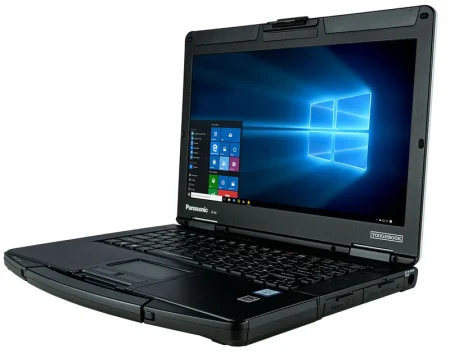



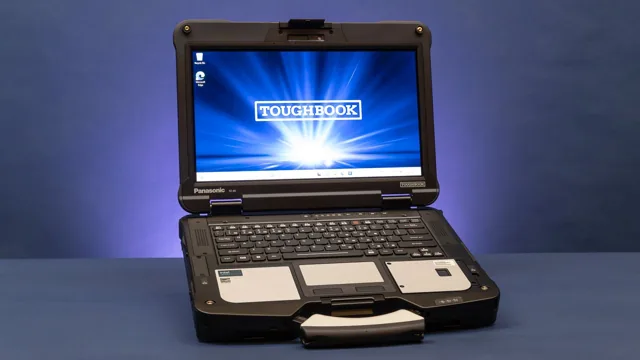
A standard business laptop may work well in an office, but it can struggle when exposed to drops, dust, vibration, rain, and temperature changes. A Panasonic Toughbook is designed for mobile and field-based work where computer reliability directly affects productivity, communication, and access to essential information. Before selecting a model, buyers should consider the work environment, required specifications, form factor, and long-term ownership costs.
Identify Where the Computer Will Be Used
Start by documenting the conditions the computer will encounter during a typical shift. A laptop used at a warehouse desk does not require the same level of protection as one installed in a police vehicle or carried across an active construction site.
Consider whether the computer may be exposed to:
- Rain or accidental spills
- Dust, sand, or airborne particles
- Repeated vibration during vehicle travel
- Drops from desks, carts, or carrying height
- Direct sunlight
- Freezing or high temperatures
- Frequent movement between indoor and outdoor areas
Understanding these risks will help you select an appropriate level of ruggedness without paying for protection your team does not need.
Compare Ruggedness Levels
Panasonic offers computers suited to different operating conditions. Some models provide added durability for mobile professionals, while fully rugged systems are built for regular use in demanding environments.
Semi-rugged laptops may include reinforced frames, stronger hinges, spill-resistant keyboards, protected storage drives, and carrying handles. These features can suit field service technicians, insurance adjusters, inspectors, and warehouse supervisors.
Fully rugged models may add sealed ports, stronger resistance to water and dust, shock protection, and displays designed for outdoor visibility. They are commonly considered for public safety, military, utility, transportation, and industrial applications.
The best choice is not automatically the model with the highest protection level. It is the computer that matches the organization’s actual operating conditions.
Review Testing Standards Carefully
Product specifications may include references to MIL-STD-810 testing and ingress protection ratings. These details provide a useful basis for comparison, but buyers should understand what they mean.
MIL-STD-810 testing can cover drops, vibration, humidity, altitude, temperature shock, and other environmental stresses. However, a device may be tested against selected methods rather than every procedure within the standard. Review the manufacturer’s documentation to see which tests apply to the model under consideration.
An IP rating indicates the device’s resistance to solid particles and liquids. The first number relates to protection against solids, while the second refers to moisture. Buyers should match the rating to expected workplace exposure and continue following the manufacturer’s use limitations.
Choose the Right Form Factor
Toughbook devices are available in several configurations, including conventional laptops, tablets, and detachable or convertible computers. The right design depends on how employees enter, read, and share information.
A traditional laptop may be preferable for writing reports, managing spreadsheets, or using keyboard-heavy software. A rugged tablet can be more practical for inspections, signatures, inventory checks, and other tasks performed while standing. A detachable model offers both input methods, allowing employees to use a keyboard at a desk and a touchscreen in the field.
Size and weight also matter. A larger display can make detailed maps or diagrams easier to read, while a smaller device may be more comfortable to carry throughout a long shift.
Evaluate the Display and Input Controls
Outdoor workers need a display that remains readable in bright conditions. Look for specifications such as high brightness, daylight readability, and anti-reflective treatment. Screen visibility should be considered alongside battery consumption because higher brightness settings can shorten runtime.
If workers wear gloves, confirm that the touchscreen supports gloved input. Rain mode, stylus support, programmable buttons, and physical controls may also be useful when a standard touchscreen is difficult to operate.
Keyboard design deserves attention as well. Backlit keys can help during nighttime work, while spill resistance may be important in emergency vehicles, workshops, and outdoor settings.
Check Battery and Charging Requirements
Manufacturer battery estimates may not reflect field conditions. Screen brightness, wireless connections, GPS, temperature, and demanding software can all affect runtime.
For extended shifts, consider models with replaceable batteries, optional secondary batteries, or hot-swappable designs. Vehicle chargers and docking stations can help teams maintain power between job sites. Organizations should also check the price and availability of replacement batteries before purchasing a large number of devices.
Confirm Ports and Wireless Connectivity
Create a list of every connection employees require. Depending on the application, this may include USB ports, Ethernet, serial ports, mobile broadband, GPS, Bluetooth, barcode scanners, external antennas, or specialized diagnostic equipment.
Built-in connections can reduce dependence on adapters that may become lost or damaged. If the laptop will be installed in a vehicle, confirm its compatibility with the required dock, mount, power supply, and peripheral equipment.
Compare New and Refurbished Options
New models typically offer current processors, longer support periods, and a broader selection of configurations. Refurbished Toughbooks may provide a more affordable option for organizations with modest software requirements or limited equipment budgets.
When reviewing a refurbished computer, check its cosmetic condition, battery health, storage type, memory, operating system, warranty, and upgrade options. The device should support required applications throughout its intended service period, not merely meet current minimum requirements.
Consider the Full Ownership Cost
Purchase price should be compared with repair expenses, accessory costs, employee downtime, warranty coverage, and expected service life. A less expensive office laptop can become costly if workplace conditions cause repeated failures.
Selecting the correct device starts with a clear understanding of how and where it will be used. To compare new and refurbished models, accessories, docks, and configuration options, visit Tough Rugged Laptops and find a computing system suited to your team’s working conditions.